June 29th, 2026
New
Improved
Fixed
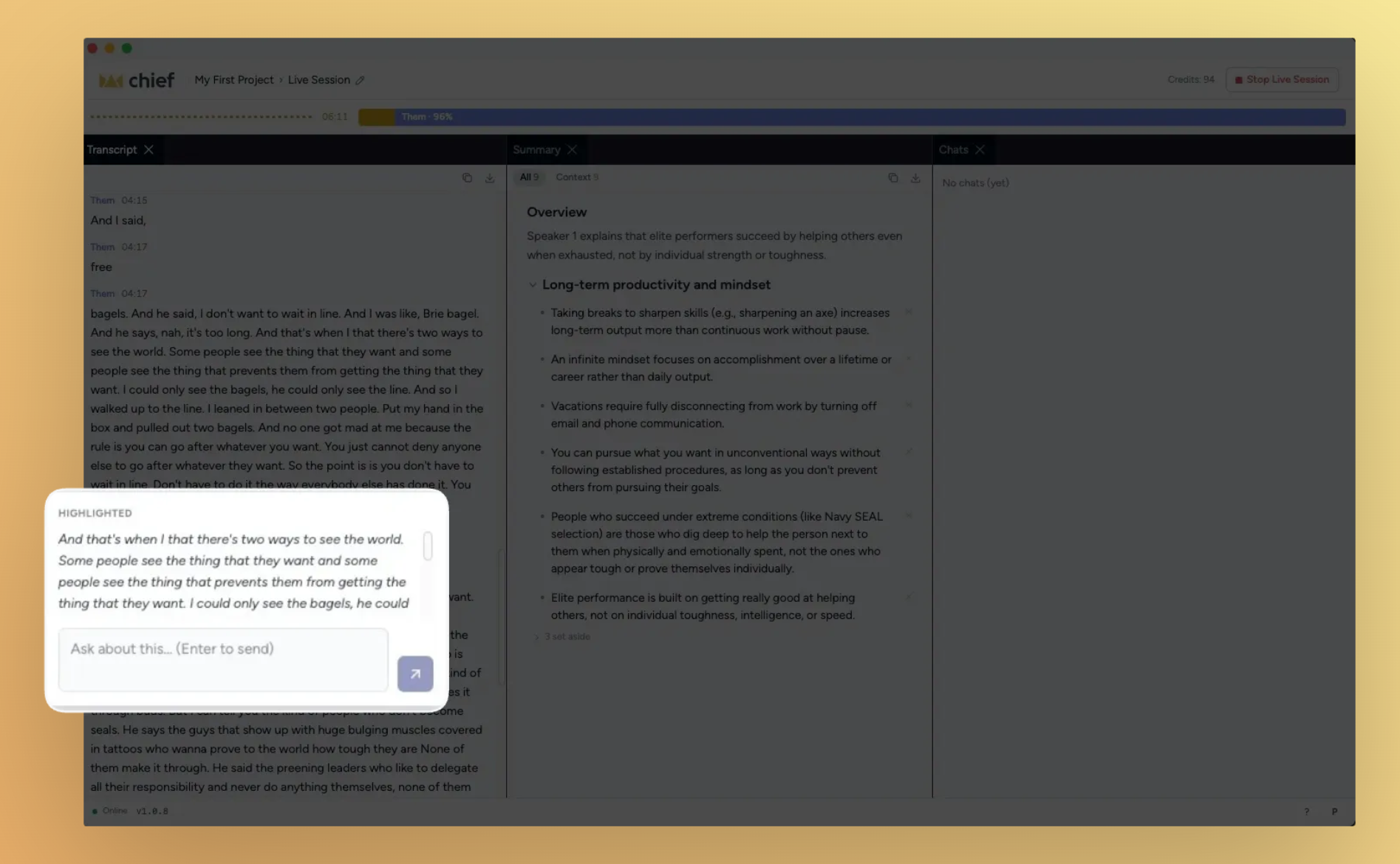
Live Sessions become your meeting co-pilot. This stretch was all about making what happens in a meeting actually useful after the fact and during it. You can now highlight any moment in a Live Session transcript and ask Chief about it in real time, watch the talk-time bar fill as each person speaks, and trust that the session stops when the call ends. Meanwhile, new users land in an interactive onboarding tour, and pasting files into the chat bar finally just works.
What's in this release
New
Highlight any transcript moment and chat with Chief about it
Speaker talk-time bar shows who's talking and for how long
Live sessions stop automatically when your call ends
Real-time summary builds as the meeting progresses
Interactive onboarding tour with a guided demo
Paste images and files directly into the Chief chat bar
Forward and reply when composing email drafts
Card view for browsing your live sessions library
Improved
Project selector redesigned for quicker navigation
Back button and breadcrumb names in the expanded panel
Organization settings available across all projects
Notification interactions use a modal instead of a block state
Chief warns you when a device pairing is revoked
Artifact cards surface more prominently in chat
Chat visibility toggle always visible with a lock/globe icon
Slack setup uses clearer field labels
Google Workspace setup includes direct navigation links
MCP and CLI links added to account settings
Device pairing page linked from the code entry screen
Chat responses prefetch for a snappier feel
Fixed
Chat threads open at the latest message, not the top
AirPods audio works reliably in the native app
Transcript now uses "you" instead of "them" for your own speech
Highlight and chat controls hidden until a session has content
Live-session nudge no longer appears during onboarding
Chats no longer break after a session has stopped
Generated artifact cards display correctly in dark mode
Action prompts handle edge cases correctly
Streamed answers reconcile cleanly when a block stops
Highlight any transcript moment and chat with Chief about it

During a live session, you can now select any span of the transcript and open a chat thread about it — without losing your place in the meeting.
Select and ask. Highlight a sentence or a block, then ask Chief a question about it right there in context.
Stays anchored. The conversation threads to the exact transcript moment you highlighted, so it's easy to find later.
Ships in the native app first. Available on the Chief desktop app for this release.
Speaker talk-time bar shows who's talking and for how long

A visual bar now tracks each participant's share of the conversation in real time, so you can see at a glance who's dominated the call and who hasn't had a chance to speak.
Updates live. The bar refreshes as the session progresses, not just at the end.
Per-speaker color coding. Each participant gets their own segment so the breakdown is instant to read.
Interactive onboarding tour with a guided demo

New users now land in a hands-on demo tour that walks through Chief's core features step by step, replacing the previous static copy.
Rewritten copy throughout. Every screen in the welcome flow has been updated for clarity and brevity.
Interactive steps. The tour responds to your actions rather than just displaying instructions.
Improvements
Project selector redesigned for quicker navigation
The project picker in the Chief app has been overhauled — faster to scan, easier to switch, and lighter on screen real estate.
Back button and breadcrumbs in the expanded panel
The expanded-panel view now includes a back button and human-readable breadcrumb names so you always know where you are and how to get back.
Live sessions stop automatically when your call ends
Chief now detects when the underlying meeting call closes and stops the session on its own. No more manual cleanup when a call wraps unexpectedly.
Real-time summary during live sessions
The session summary no longer waits until the call ends. It builds progressively as the meeting runs, so you have context ready to act on before anyone hangs up.
Card view for the live sessions library
Your live sessions page now supports a card layout, making it easier to scan recent sessions at a glance — especially as your library grows.
Paste images and files directly into the chat bar
You can now paste an image or file into the web prompt bar without touching the file picker.
Forward and reply when composing email drafts
Email drafts now support forwarding and replying in-thread, so you can handle full conversations without leaving Chief.
Org settings available across all projects
Organization-level settings are no longer scoped to a single project — they're now accessible from any project context.
Notifications use a modal, not a block state
Clicking a notification now opens a focused modal instead of locking the interface in a loading state — cleaner and easier to dismiss.
Chief warns you when a device pairing is revoked
If your device pairing is revoked, the Chief app now surfaces a clear warning so you know to re-pair rather than wonder why the session isn't connecting.
Artifact cards are more prominent in chat
Generated artifacts now display as prominent cards in the chat window, so they don't get lost in the conversation flow.
Chat visibility toggle always visible
The lock/globe icon that controls chat visibility is now always visible in the toolbar — not just on hover — so you can always see and change who can see a conversation.
Slack setup uses clearer field labels
The "Bot token" field in the Slack integration settings has been renamed to "Bot User OAuth Token" — matching exactly what you see in the Slack developer console.
Google Workspace setup includes direct navigation links
The Google Cloud and Google Workspace setup flows now include direct links to the exact pages you need, cutting out the back-and-forth of hunting through admin consoles.
MCP and CLI links added to account settings
A shortcut to the MCP and CLI setup docs is now available directly from the account settings pop-up.
Device pairing page linked from the code entry screen
The pairing code entry screen now includes a direct link to the device pairing page, removing a navigation step when setting up a new device.
Chat responses prefetch for a snappier feel
Chief now prefetches chat data in the background, reducing the time between opening a chat and seeing its content.
Fixes
Chat threads open at the latest message
Opening a thread used to scroll to the top instead of the most recent message. Threads now open at the bottom, right where the conversation left off.
AirPods audio works reliably in the native app
A compatibility issue caused audio capture to fail silently with AirPods. That's resolved.
Transcript uses "you" for your own speech
The live session transcript was labeling your own speech as "them" in some configurations. It now correctly uses "you."
Highlight and chat controls hidden on empty sessions
The highlight and chat controls are now correctly disabled until a live session has content — tapping them on an empty session no longer triggers a broken state.
Live-session nudge hidden during onboarding
New users were seeing the live-session start nudge in the middle of onboarding. That prompt is now suppressed until onboarding is complete.
Chats work correctly after a session stops
Chat initiated after a live session ended was behaving incorrectly in some cases. The session-stopped state is now handled cleanly.
Artifact cards display correctly in dark mode
Row hover states in the generated artifacts section were inconsistent in dark mode. Both card prominence and hover behavior are now correct.
Action prompts handle edge cases correctly
Several edge cases in the action prompt flow — including input validation and state transitions — have been patched.
Streamed answers reconcile cleanly when a block stops
In rare cases, a streamed answer and the final persisted text could diverge when a block was stopped mid-stream. That gap is now closed.
June 22nd, 2026
New
Improved
Fixed
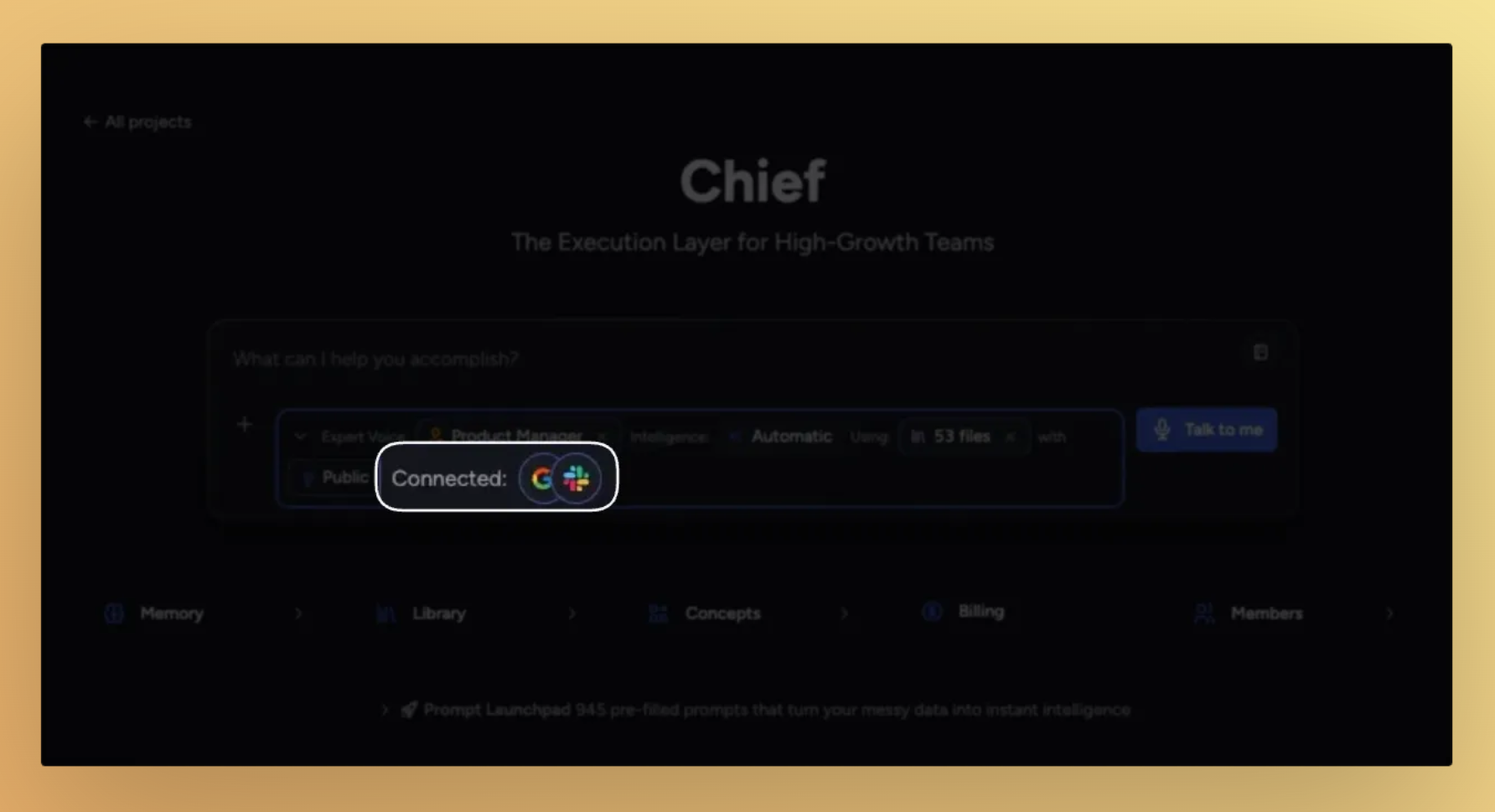
Chief is now more connected, more reliable, and easier to use across both Live Sessions and integrations. This release focuses on two big areas: connecting Chief to your tools, and making Live Sessions more complete with summaries, timestamps, and exports.
What’s new
Chief now connects to Google Workspace and Slack

Chief can now take actions inside your tools, not just read from them.
Connect Google Workspace to access and work with Docs, Calendar, and related data
Connect Slack to search and act on information from your workspace
Every tool action includes a clear approval step before anything runs
Access respects workspace roles and permissions for collaborators
Live Sessions are now fully structured and easier to use

Live Sessions now capture more context and are easier to review after the call.
Every line in the transcript includes timestamps
Full session summaries are automatically generated when the session ends
Sessions are automatically titled based on the conversation
You can rename a session while it is still recording
You can copy or download full transcripts and summaries
Sessions now prompt you to stop when a call ends to avoid leaving them running
Each session now has a clearly defined host
You can now chat directly with Actions to refine or follow up on outputs
Other new features
Citations now appear directly in the Chief app
Generated files now appear as trackable cards in chat
Improvements
Theme settings

The Chief app now supports light, dark, and system-based themes.
Device pairing

Pairing has been simplified into a clearer step-by-step flow.
Project picker

Improved search results while typing
Retry support if loading fails
Automatically collapses after selection
Navigation and chat performance

Live Session breadcrumb is now clickable for easier navigation
Long chat threads now load older messages only when needed for better performance
Fixes
Live Sessions
UI no longer clips when system zoom changes
Audio now recovers automatically when Bluetooth or AirPods reconnect
Timer now correctly tracks from session start time
First-time users now see the onboarding modal
Onboarding no longer repeats completed steps
Chat and actions
Chat duration no longer shows incorrect long time periods after reload
You can no longer submit while a file is still uploading
Create Action form no longer gets prefilled by stray text
Prompt preview tooltips now display reliably
Deep Intelligence submissions are blocked when credits are empty
Navigation and system behavior
Logged-out users are now prompted to sign in instead of hitting broken pages
Pairing codes are now consistent across browser tabs and always visible in the app
June 16th, 2026
New
Improved
Fixed
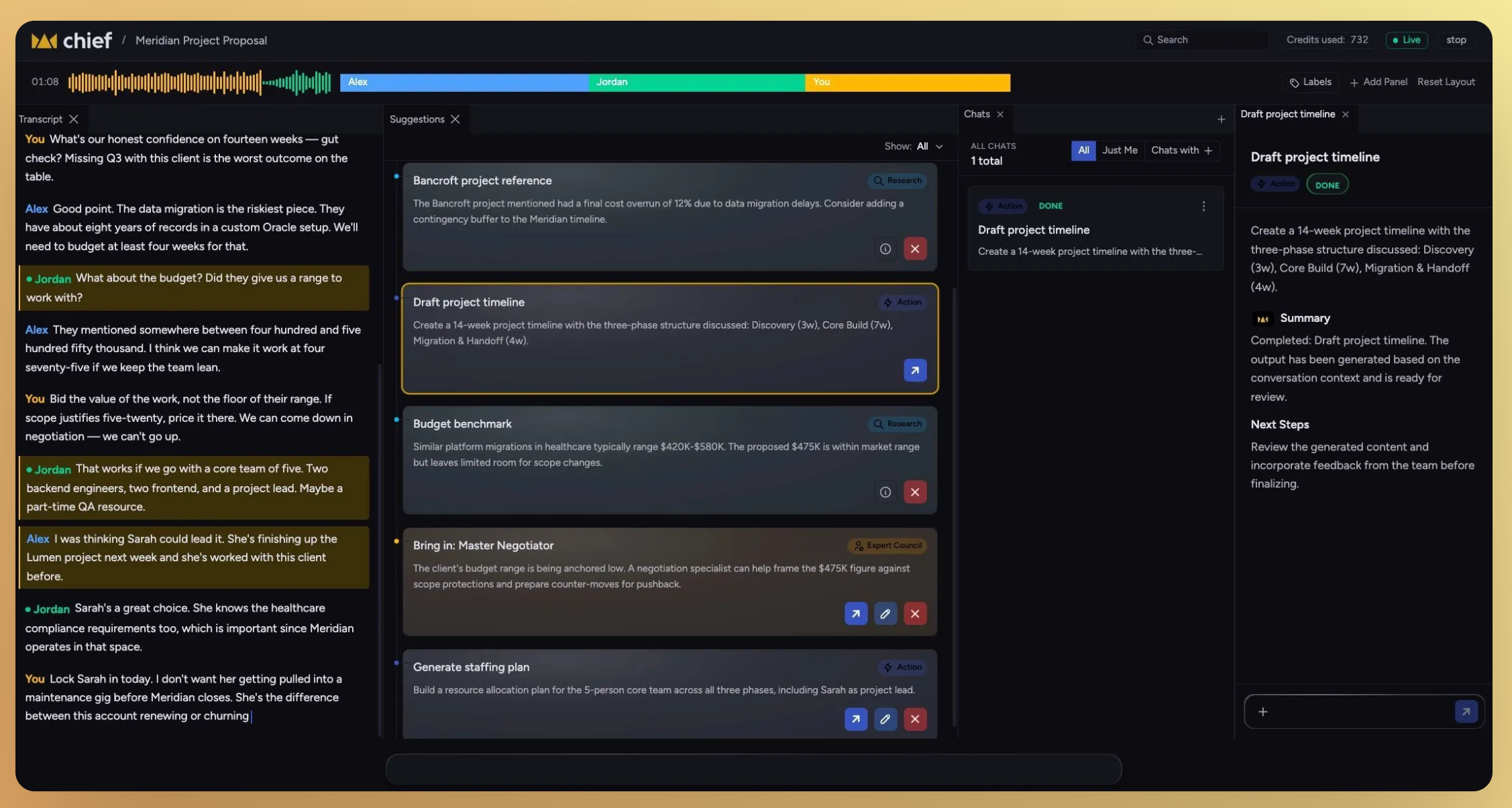
Live Session App, fully loaded.
This week’s release focused heavily on the Live Session App — making setup faster, exports more useful, transcripts more reliable, and the overall experience feel significantly more polished across web and native app surfaces.
You can now pair and set up the Live Session App in seconds, export transcripts and summaries anywhere, chat directly with captured actions, and use the app in light, dark, or auto theme modes.
Alongside the major updates, we also improved transcript quality, streamlined navigation, refined session summaries, and resolved a number of issues affecting session state, timestamps, and UI consistency.
Download the Live Session App here: https://chief.bot/landing/live-session
Learn how to setup Live Session app here: Live Session Overview
What’s in this release
New
Live Session App
Pair and set up the Live Session App on first use
Export transcripts, summaries, and chat threads
Chat with captured actions
Improved
Light, dark, and auto themes
Speaker timestamps in live transcripts
Full summaries for every session
Project picker search and navigation
Transcript echo cancellation
Live Session App UI and native app polish
Fixed
Chat activity duration no longer inflates across reloads
Copy/download buttons now hide when sessions stop
Stopped sessions no longer show as “Live”
Session names and owner visibility
Typography and interface alignment
Pair and set up the Live Session App on first use
Getting started with the Live Session App is now significantly faster and easier for first-time users.

The onboarding flow now guides users through pairing their device directly inside the app, with clearer prompts, inline instructions, and automatic pairing link generation if a code is lost.
Highlights

Device pairing now starts directly from the welcome screen
Pairing codes persist across browser tabs
Inline helper text guides users through setup
“Generate Link” instantly creates a new pairing link if needed
First-time Live Session onboarding now explains the capture flow before a session starts
Export transcripts, summaries, and chat threads

Everything captured during a Live Session can now be exported and shared more easily.
Users can copy content directly to their clipboard, download it as a file, or move it into external tools and workflows without extra formatting work.
Highlights
Export full diarized transcripts with speaker names and timestamps
Export summaries, action items, and decisions
Copy or download summaries as Markdown or plain text
Export chat conversations with Chief about a session
Copy action items into reusable to-do lists
Improvements
Light, dark, and auto themes
Chief now supports light mode, dark mode, and automatic system theme detection.
Speaker timestamps in live transcripts
Speaker sections now include timestamps so users can quickly jump to important moments in a conversation.
Full summaries for every session
Every completed session now automatically includes a generated summary without requiring an additional prompt.
Project picker improvements
Project switching is now faster and more reliable with improved search, retry handling, and smarter collapse behavior for previously selected projects.
Transcript echo cancellation
System audio echo is now filtered more effectively, improving transcript clarity and speaker reliability.
Live Session App and native app polish
A wide range of UI and usability improvements shipped across the Live Session App and native experience.
Included updates
Live session breadcrumbs are now clickable
Session UI scales correctly with zoom changes
Live session icons are now consistent across surfaces
Native app typography and spacing were refined
Project context now persists through billing upgrade flows
Download states now show progress while transcripts process
Fixes
Chat activity duration no longer inflates across reloads
Chat timestamps now correctly reflect the actual time since the last activity.
Copy/download buttons hide when sessions stop
Export controls now disappear correctly once a session has ended.
Stopped sessions no longer show as “Live”
Session state now updates immediately after capture stops.
Session names and owner visibility
Live Sessions now display the correct owner and generate clearer default session names.
Name alignment across web, app, and tools
Terminology for Live Sessions, transcripts, and capture flows is now consistent across the web app, native app, and tools.
Speaker identification reliability
Resolved issues that occasionally prevented speaker diarization from completing on some call types.
June 8th, 2026
New
Improved
Fixed
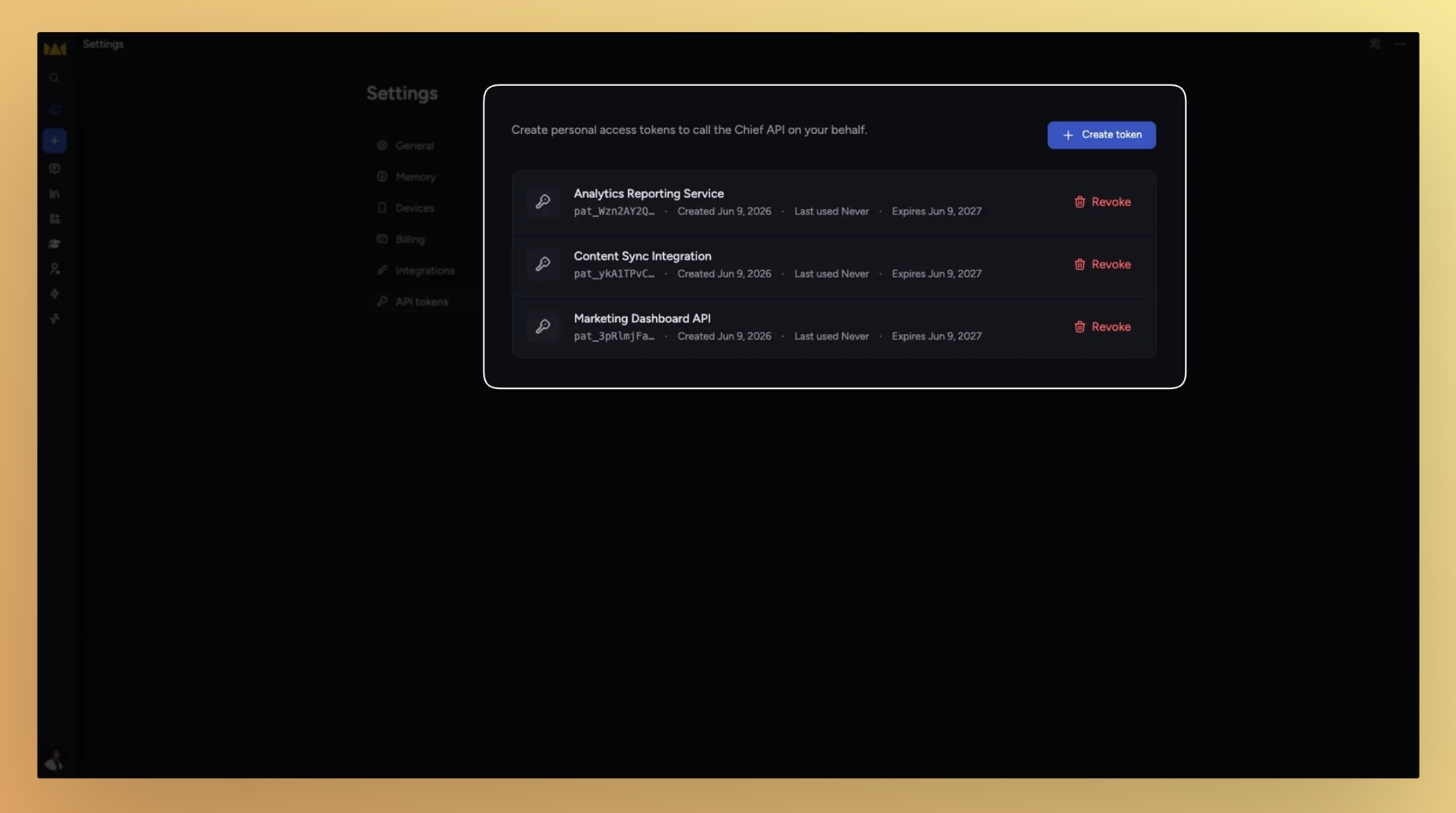
The headline for this stretch is a public API — teams and power users can now build on top of Chief directly. Alongside that, a round of fixes cleaned up some rough edges that had been trailing for a while.
What's in this release
New
Public API with personal access tokens
Copy button on raw text and markdown assets
Download any file from its context menu
Improved
Markdown spacing now matches Notion
Navigation tabs reordered and retitled
Labels and actions lists now paginate
Fixed
Pasted-content pills survive copying across chats
Keywords in pasted prompts stay as text, not pills
Deleting a chat while a response is streaming now works
Raw JSON no longer appears in the Chief interface
Actions no longer fail when an item isn't found
Files move correctly while processing is in progress
Upload modal stays open on outside clicks
New
Public API with personal access tokens

Chief now exposes a public API. Generate a personal access token in your settings and start connecting Chief to your existing tools, automations, or custom integrations.
Personal access tokens. Create and manage tokens tied to your account for secure, scoped access.
Full OpenAPI documentation. The API ships documented and versioned.
Improvements
Markdown spacing now matches Notion

Output formatting follows Notion's spacing conventions. Content you copy from Chief lands cleanly in Notion without manual whitespace cleanup.
Labels and Actions lists now paginate
Long lists of labels and actions were getting cut off. Both now paginate so every item is reachable.
Copy button on raw text and markdown assets
A one-click copy button now appears on raw text and markdown asset views.
Download any file from its context menu
Every file in your workspace has a Download option in its right-click context menu.
Fixes
Pasted-content pills survive copying across chats
Pills added from pasted prompts were being dropped when a chat was copied to another context. They now transfer correctly.
Keywords in pasted prompts stay as text
Text pasted into a prompt was being automatically converted into keyword pills. Content you paste now stays exactly as written.
Deleting a chat while streaming now works
Attempting to delete a thread while Chief was still generating a response would silently fail. Deletion now works at any point.
Raw JSON no longer appears in the Chief interface
Tool call output was occasionally surfacing as raw JSON instead of being processed. It's now handled cleanly.
Actions no longer fail when an item isn't found
Chief was returning an error when attempting to look up an action that no longer exists. It now handles that case gracefully and continues.
Files move correctly while processing is in progress
Assets being relocated while still processing could end up in an inconsistent state. File movement now completes cleanly regardless of processing status.
Upload modal stays open on outside clicks
Clicking outside the upload modal was dismissing it before the upload completed. The modal now requires an explicit close action.
May 28th, 2026
New
Improved
Fixed
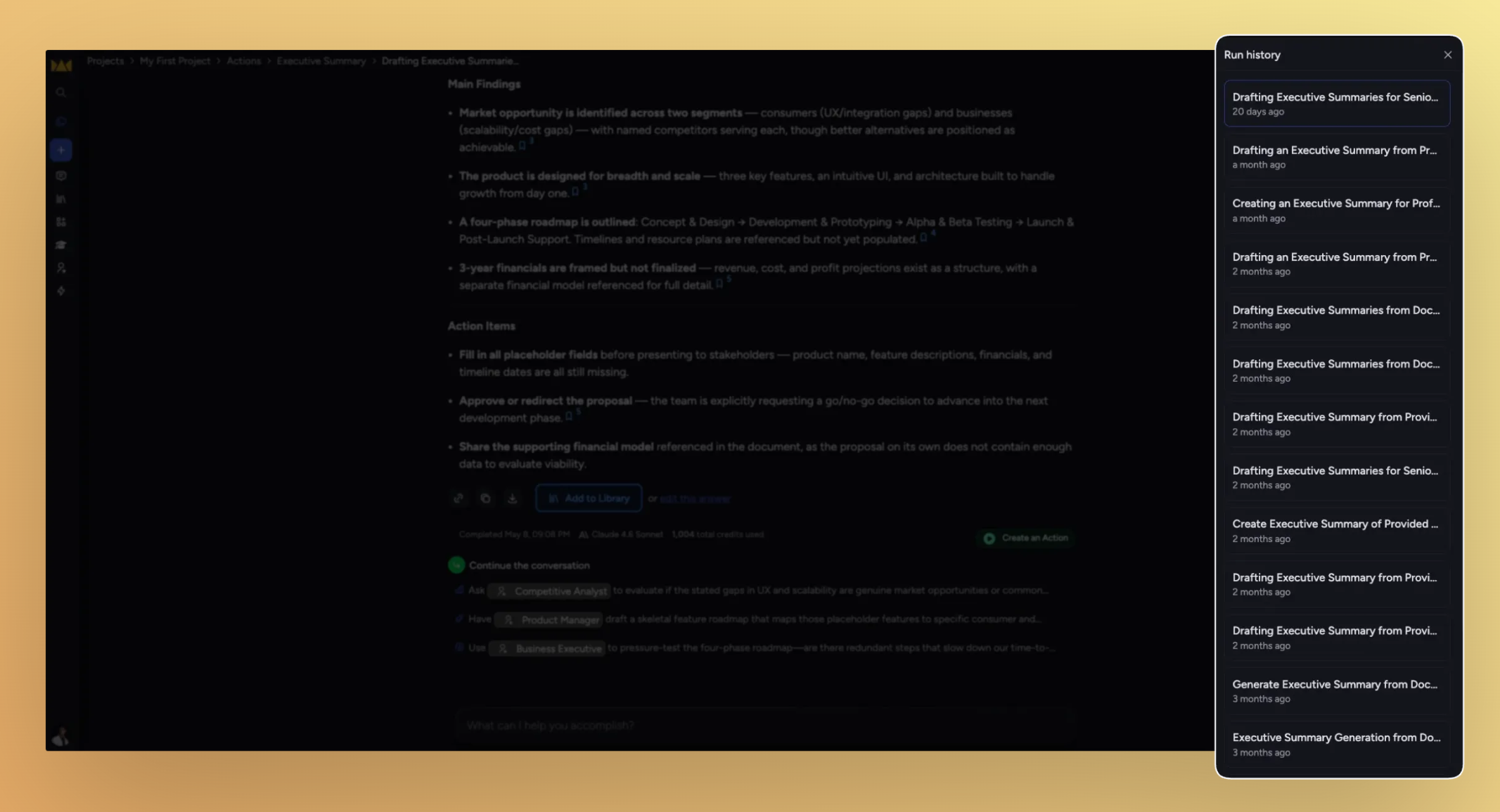
Run history, at a glance. This update is about reading and acting on your Action runs faster: Labels now show right in the run history list, the panel behaves the way you expect, and a handful of editor snags got smoothed out along the way.
What's in this release
Improved
Run Now moves onto the Run History header
The Run History panel closes on its own
Edit an action straight from its card
Scrolling the actions panel footer is more forgiving
Project homepage cards line up on one row
Fixed
Chat history times show in your local time zone
Pasted links join the line you're typing on
Backspace exits an empty list cleanly
"Clear all" no longer overlaps the prompt bar icons
Run history is easier to scan and run

The run history list and your action cards picked up a round of polish that makes long histories quicker to read and act on.
Labels in the run history list. Each run shows its labels inline, so you can scan many runs without opening each one. Rows show up to four labels, with a +N more toggle when there are more.
Run Now on the header row. The Run Now button now sits on the Run History heading instead of a separate footer.
The panel closes itself. Clicking outside the Run History panel, picking a run, or pressing
Escnow dismisses it.Inline edit on action cards. An edit icon on each action card lets you jump straight into editing.
Improvements
Scrolling the actions panel footer is more forgiving
The footer of the actions panel now accepts scroll input across a wider area, so the list keeps scrolling even when your pointer drifts to the bottom edge.
Project homepage cards line up on one row

The project homepage cards — Memory, Library, Concepts, Billing, and Members — now fit on a single row on wide screens, and step down gracefully to three, two, or one column as the window narrows.
Fixes
Chat history times show in your local time zone
Chat history rows were showing server time instead of yours, so a 5:30 AM chat could read as 10:30 AM. Times now render in your browser's local time zone.
Pasted links join the line you're typing on
Pasting a URL into the prompt now merges it inline with your text instead of dropping it onto a new line.
Backspace exits an empty list cleanly
Pressing
Backspaceat the start of an empty list item now lifts you back out to a normal paragraph, the way it should.
"Clear all" button no longer overlaps the prompt bar icons
The Clear all control and the prompt bar's action icons stopped overlapping, so each stays tappable.
May 22nd, 2026
New
Improved
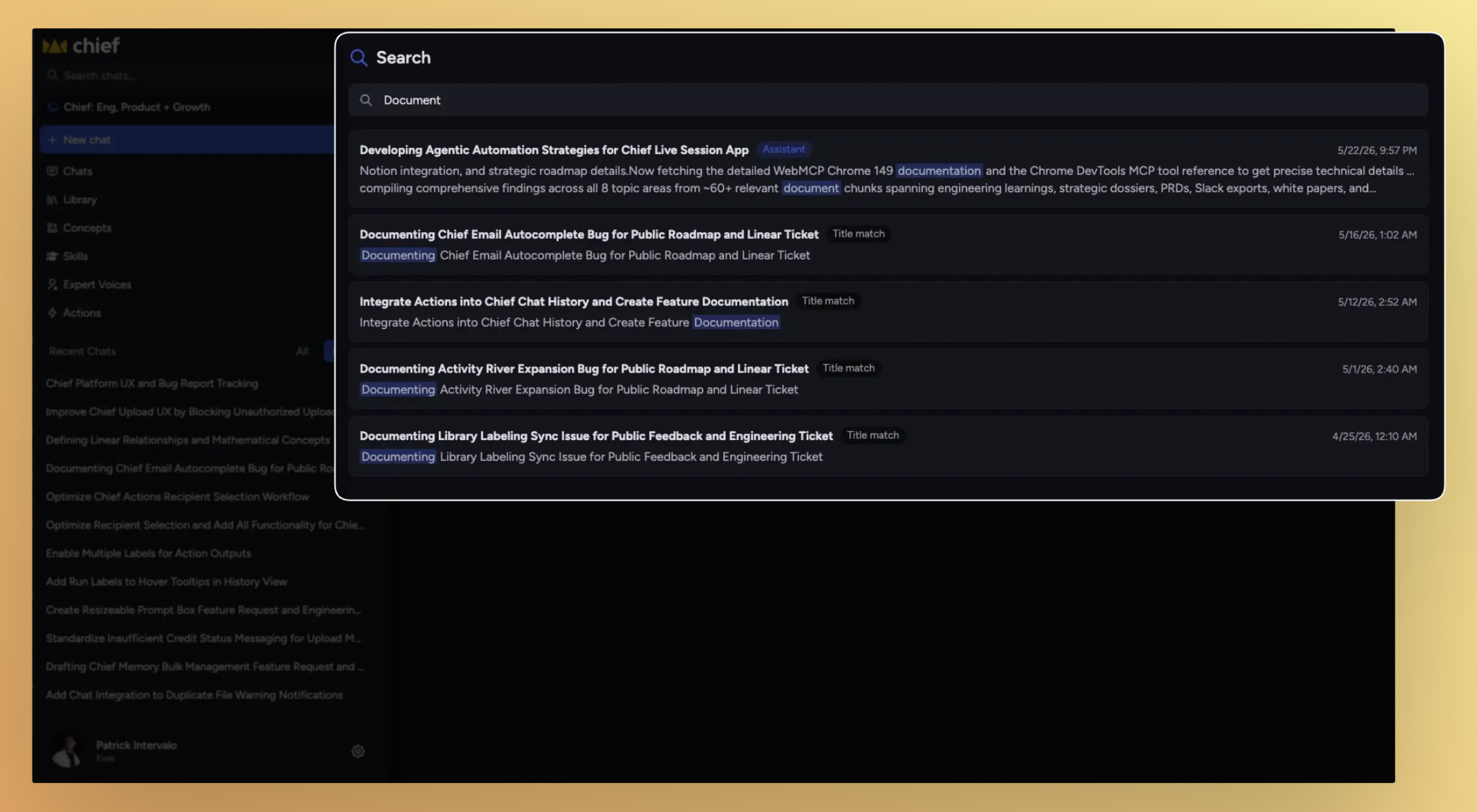
Chat Search now lets you search across indexed conversations using keywords, phrases, and chat titles, making it easier to revisit past work and bring previous context into new chats.
What’s new
Chat Search now allows you to:
Search across indexed conversations
Find both user prompts and assistant responses
Search using keywords or partial words
Open directly to the matching message in a chat
Search chat titles
@mention previous chats in a new conversation as context
Learn more: Chat Search
How it works
Chat Search indexes conversations and allows you to query them using keyword-based matching.
Search covers:
User messages
Assistant responses
Chat titles
Results are ranked based on:
Keyword relevance
Recency (with a boost for newer conversations)
Search behavior
Chat Search uses token-based keyword matching with prefix support.
Each search term matches as a prefix
Multiple words must all appear somewhere in the chat
Search is case-insensitive and punctuation-insensitive
Chat Search does not support:
Fuzzy matching
Synonyms
Stemming
Exact phrase matching
Results
Each result is labeled based on what matched:
Assistant → match found in an AI response
You → match found in a user message
Title → match found in the chat title
Clicking a result opens the chat directly to the matching message.
Access
Chat Search is available through the Search interface in Chief and works across indexed chats within your accessible Projects and organizations.
May 14th, 2026
New
Improved
Fixed
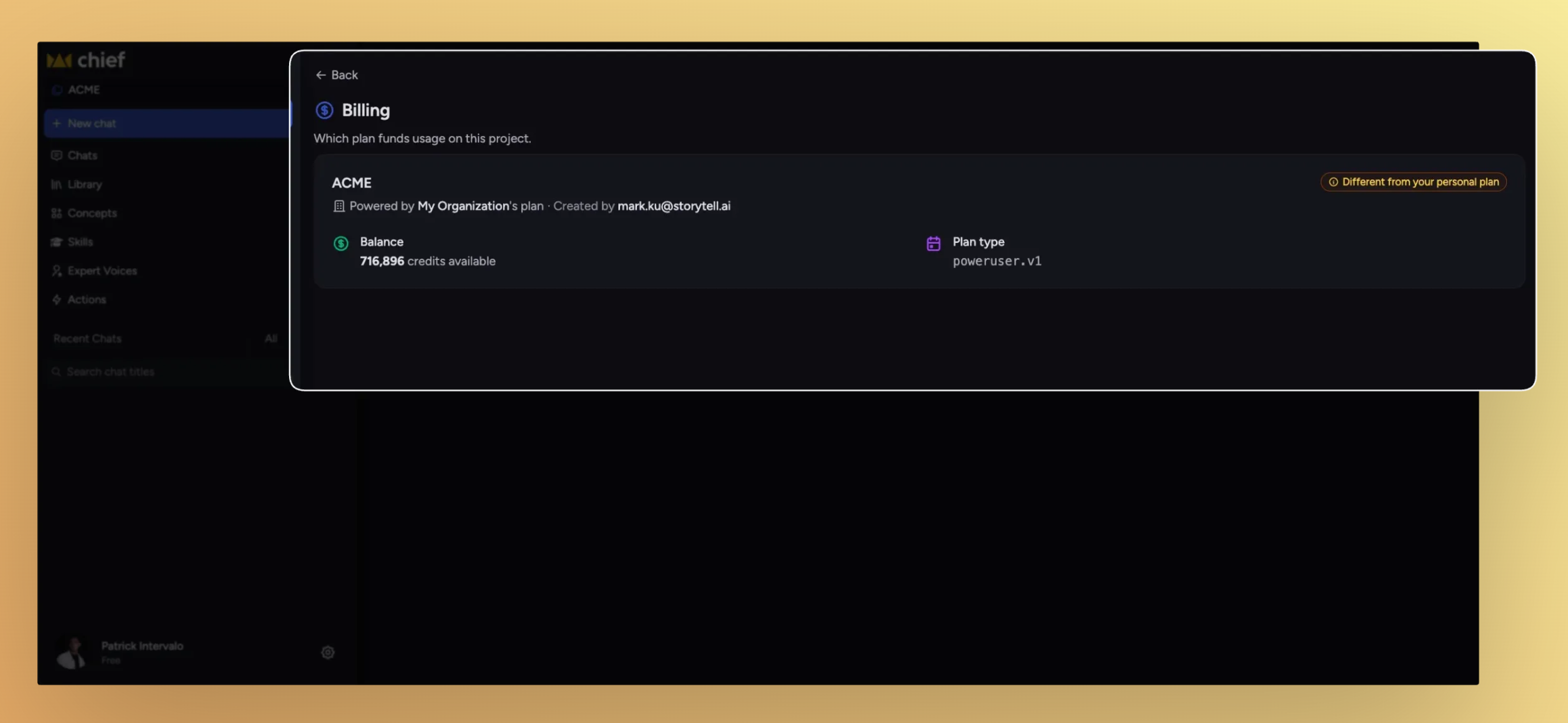
Two important things this release: a new billing system for Project owners, and a workspace-shell tune-up for everyone. Owners can now decide whose credits get drawn against for a Project's usage. Around that, the left sidebar listens to your drag, the chats list compacts when you want to scan more at once, and panel close controls finally land in the same place every time.
What's in this release
New
Decide who pays for a Project's usage
Drag the left sidebar to whatever width fits
Pick how dense your chats list feels
Improved
Close controls now land in the same place every time
Invitations show up without a refresh
Fixed
Secret Link, Email, and Domain invite buttons now actually invite
The actions list no longer flickers when you hover near its edge
The Run history pill stops covering the Share button
Collaborators and readers can see the actions they're allowed to
Decide who pays for a Project's usage

Each Project now has a billing mode that controls whose credits fund the work inside it — useful when one organization is running the Project but another is footing the bill. Set it from the Project's new Billing page, and switch context from the command palette whenever you need to.
Organization pays. The org that owns the Project covers all usage across every member. This is the new default for newly created Projects.
Each member pays for their own. Every member draws from their own plan as they go — the way billing worked before.
Pick a specific payer. Designate any org you belong to as the payer for everything that happens in the Project, regardless of who's running the work.
Want help getting this set up? Email us at support@chief.bot and we'll walk you through it
The workspace shell gets a tune-up

A bundle of layout polish around the navbar, side panels, and chats list — all aimed at giving you more control over how the workspace fits your screen.
Drag the left navbar to any width up to 40% of your viewport. Double-click the resize handle to snap back to default. Your width persists across reloads.
Compact / Detailed toggle on the chats toolbar. Compact tightens row padding and hides the audit metadata; Detailed keeps everything visible. Your pick sticks across sessions.
Close controls anchor to the left edge across the app — side panels, Activity timeline, operation cards. Page-provided actions like Chat move to the right. The redundant Back button in the side panel header is gone, and so is the green checkmark on finished operations (the title already says they're done).
Improvements
Invitations show up without a refresh
When someone invites you to a Project, the new Project now appears in your list automatically — no reload, no logging out and back in. The list streams updates over the live connection.
Fixes
Secret Link, Email, and Domain invite buttons now actually invite
The three invitation entry points were rendering but not wired up. Clicking any of them now opens the right flow.
The actions list no longer flickers when you hover near its edge
Hovering at the right edge of an action row used to oscillate the reveal animation, looping the row open and shut. Hover is steady now, in Chrome, Safari, and Firefox.
The Run history pill stops covering the Share button
When the main content column got narrow, the Run history pill could overlap the Share button in the chat thread header. The sticky header now reserves space for the pill whenever it's visible.
Collaborators and readers can see the actions they're allowed to
A permissions refactor briefly hid actions from collaborators and readers. They show up again, scoped to what each role is allowed to do.
May 11th, 2026
New
Improved
Fixed
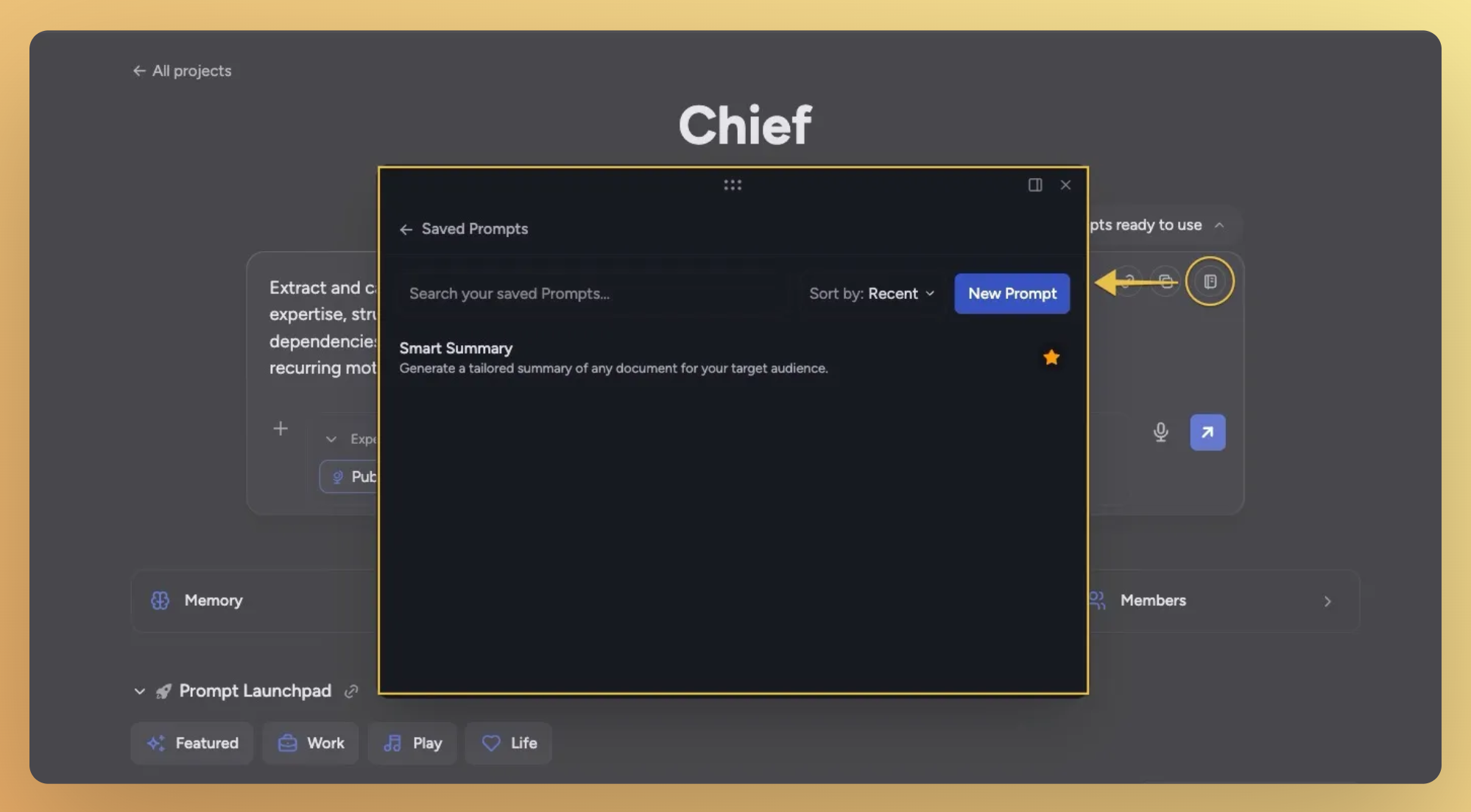
Nothing gets thrown away
Three small stories add up to a release about not losing your work:
Saved Prompts now layer onto whatever's already in the prompt bar (instead of clobbering it)
Files that hit a credit limit can be retried in place (no more delete-and-re-upload), and
The upload modal hangs around through real work before tidying itself up.
What's in this release
New
One-click access to Saved Prompts from the prompt bar
Try Again for files that ran out of credits
Improved
Saved Prompts append to the prompt bar instead of overwriting
Upload status modal stays visible through real work
Insufficient-credits files behave sensibly in the scope picker
Chats default to showing everyone's work, not just yours
Fixed
Markdown formatting now survives .doc export
"1 file" reads correctly when one file is in scope
Saved Prompts — renamed, faster, and stop overwriting your draft

What used to be called the Prompt Library is now Saved Prompts throughout the chat and sidebar — clearer wording for the workflow most of you actually do. The bigger change is what happens when you drop one in.
Quick-access icon in the prompt bar. A new notebook icon at the top-right of the chat input opens Saved Prompts directly — no more digging through the plus menu.
Insert appends, not overwrites. Pull a saved prompt into a bar you've already started typing in and it merges onto what's there instead of wiping your draft. An empty bar still inserts cleanly.
Focus jumps to the right place. After inserting, focus and scroll land on the first template variable of the prompt you just added — not somewhere off-screen.
Try Again for files that ran out of credits

If a file fails to process because your account ran out of credits, you no longer have to delete and re-upload after topping up. A Try Again button now sits next to the Insufficient credits pill — click it, the file re-queues, and you see live feedback as it goes.
Both surfaces. The Try Again button appears on the library card and the asset detail panel.
Live status. Spinner while requeuing, green Queued on success, red Retry failed with the server error in the tooltip if something else goes wrong.
Scope picker handles it cleanly. Rows for insufficient-credits files are no longer selectable in the scope picker, but the same Try Again button lives right inside the row so you can recover the file without leaving the picker.
Improvements
Upload status modal stays visible through real work
The upload modal used to auto-minimize on a flat 10-second timer regardless of whether your files had actually finished. Now it stays open while uploads are running and gracefully steps out of the way once the batch is fully ready — minimizes after about a second and a half, dismisses a couple of seconds after that. Minimizing manually still cancels the auto-dismiss sequence, so you can keep the pill on screen if you want it.
Chats default to showing everyone's work, not just yours

The author filter on the Chats page now defaults to All instead of Mine, and the segmented control is reordered to put All first. The sidebar's Recent Chats section drops the mine-only filter entirely and is relabeled simply Recent Chats. Invitees to a shared project no longer land on an empty list.
Fixes
Markdown formatting now survives .doc export
Downloading a chat to .doc was running everything through a plain-text stripper before wrapping it in paragraphs — headings, lists, emphasis, code, and tables all disappeared. The export now walks the same content structure the chat does and emits semantic HTML, so Word renders the file with the same formatting you see on screen. PDF export was untouched and still works the same.
"1 file" reads correctly when one file is in scope
The collapsed scope summary in the prompt bar was rendering "1 files" — it now switches to the singular form when exactly one file is attached.
May 8th, 2026
New
Improved
Fixed
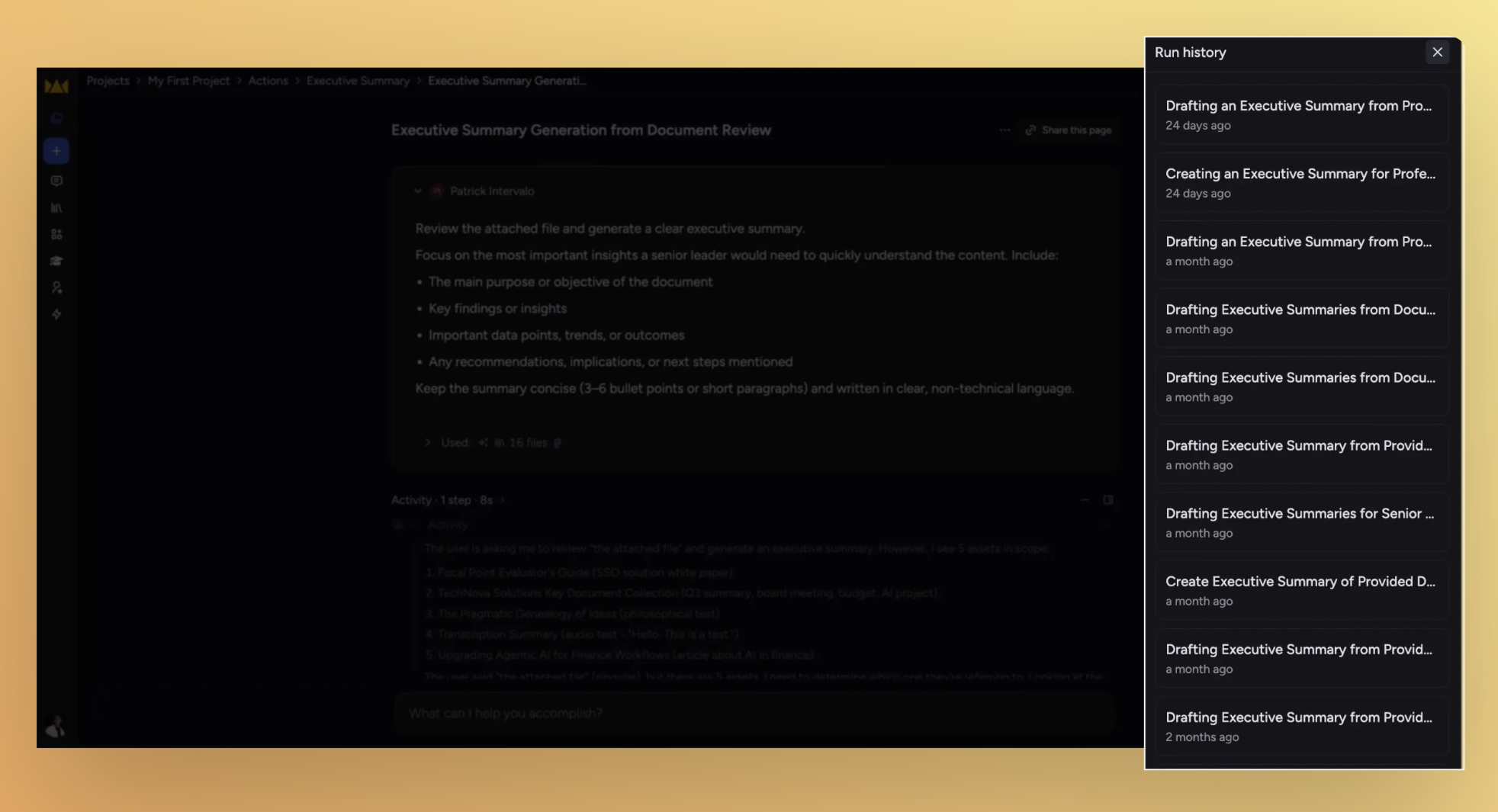
This update is about keeping you in flow: browse past action runs without leaving chat, see your library files rendered the way they were meant to look, and unstick the ones that got hung up along the way.
What's in this release
New
Browse action runs without leaving the thread
Library files preview the way they're meant to look
Improved
See and unstick files in flight
One click out of fullscreen
Removing an Expert mention leaves a clean sentence
Fixed
The text-selection menu yields when you scroll past it
Pasted text expands without phantom whitespace
Newly uploaded files are searchable right away
@mentioning a file no longer wipes your prompt
Browse action runs without leaving the thread

A new Run history drawer slides in on the right whenever you're inside an action's execution context, listing recent runs so you can hop between them without breaking out of chat.
Trigger sits in the top-right. Toggle it from the corner; your last open/closed state sticks across reloads.
Library files preview the way they're meant to look

Markdown files in your library now render as Markdown — both in card thumbnails and in the side-panel preview — instead of an unformatted text blob.
Toggle between formatted and raw. New
View as MarkdownandView as Plain Texttabs let you flip between rendered and source, with full keyboard navigation.Plain-text files get the same treatment.
.txtfiles preview through the same renderer, with the raw source one tab away.
Improvements
See and unstick files in processing
The processing-wait modal now lists every upload with its current status and a delete action.
Files stuck in upload or processing for over 3 hours surface a
Cancelaction in the scope picker.Failed files surface a
Removeaction — no more waiting on backend retries.
One click out of full screen
The presentation overlay now shows a close (X) in the top-right; the redundant Full Screen toggle is gone from the bottom toolbar. Esc still works.
Removing an Expert mention leaves a clean sentence
When you remove an Expert from an improved prompt, the surrounding "Use … to" wrapper goes with it, and the surviving verb is capitalized — so you get "Extract the key concepts…" instead of "Use to extract…".
Fixes
The text-selection menu yields when you scroll past it
"Do more with this text" now hides when the highlight scrolls out of the chat viewport and re-anchors when you scroll back. Your selection is preserved across the trip.
Pasted text expands without phantom whitespace
Collapsing pasted content into the prompt editor no longer leaves stray top or bottom blank lines, and numbered lists keep their numbering instead of resetting.
Newly uploaded files are searchable right away
Assets that just finished uploading now participate in LLM search instead of waiting for a later state.
@mentioning a file no longer wipes your prompt
Selecting a file from the @-mention picker used to feel like a brief page reload and clear what you'd typed. The prompt editor now holds its place when you pick a file.
May 6th, 2026
Improved
Fixed
Upgraded
Take what Chief makes for you
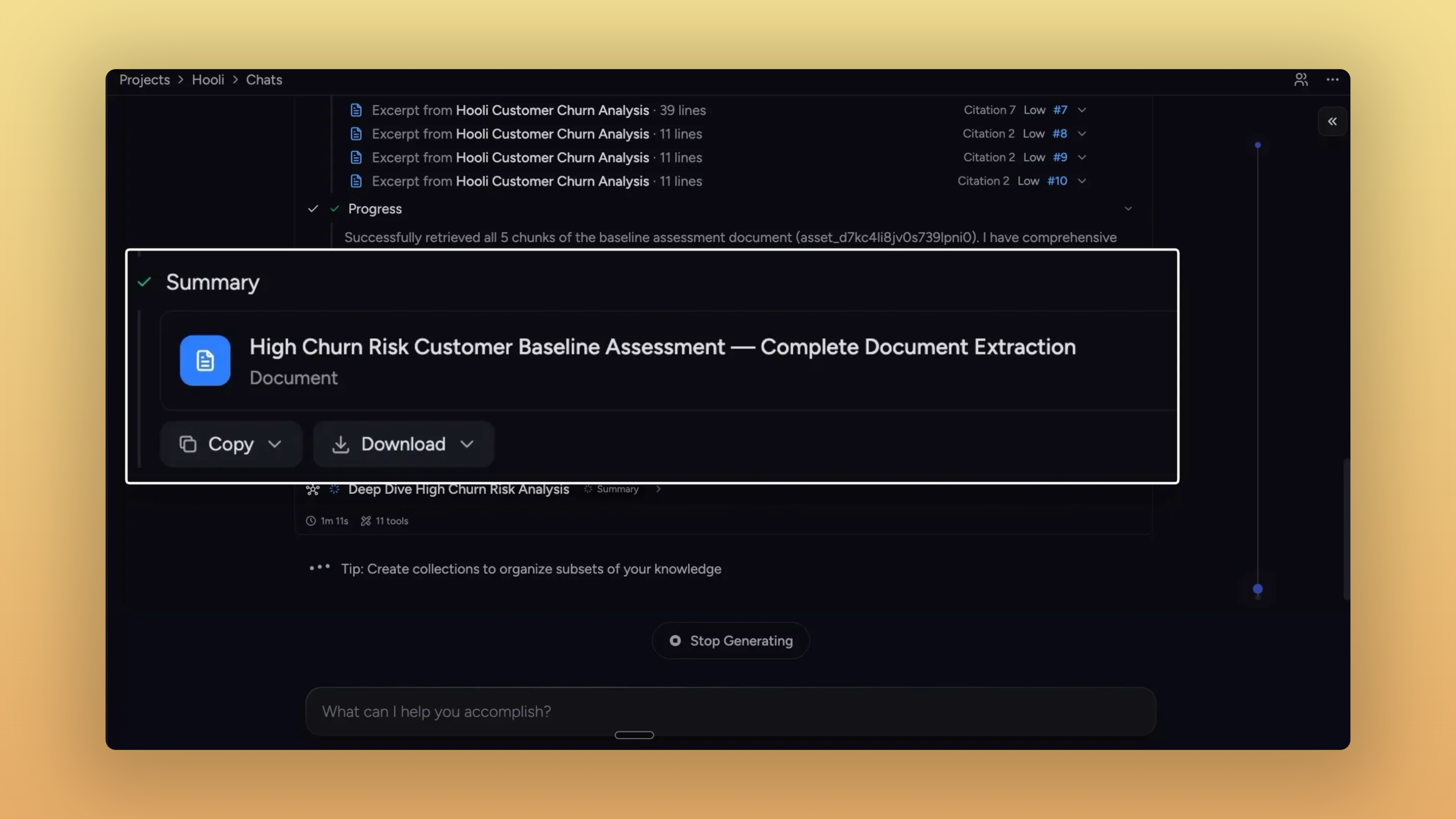
The thread this stretch is what happens after Chief gives you something — reports, sub-agent outputs, action results, pasted prompts. Each one now has a clearer path out of Chief: into your library, your clipboard, or whichever file format your next step needs.
Anything Chief makes, you can take with you
If Chief made it, you can grab it.
Sub-agent reports get the same export controls as final answers.
Activity timeline: Edit, Download PDF, Add to Knowledge Base,
Summary and collaboration outputs: Copy + Download menu, with rich text on the clipboard.
Tables in those exports go cleanly to CSV or XLS.
Same actions appear in the side panel when you open a sub-agent doc.
Side-panel reports download in the format you need. PDF, Markdown, plain text, DOC — and CSV / XLS when the report contains tables.
Action outputs save straight to your library. Persisted as library assets with their execution metadata attached.
Pasted text lands in your library — with a custom title. Rename inline and save from the same dialog, no detour required.
One-click copy on every prompt. Skills, Personas, and Actions get a hover-revealed copy button on edit and view surfaces.
Bare URLs in Chief's responses are clickable. No
https://prefix needed — they open in a new tab.No more collapsible markdown toggles in answers. Responses render as plain semantic headings, easy to read and copy.
Improvements
Library

A new Compact view. Three-way View control — Expanded, Normal, Compact — collapses each row to a single line.
Toolbar lines up again. Delete, Labels, Copy, Move, Deselect now sit on one row; segmented controls match button heights.
Single-file chat stays single-file. Clicking Chat from an upload-progress toast scopes the chat to just that file.
File pages show processing status. Queued, uploading, processing, indexing, or ready — without bouncing back to the library.
Labels sort by who actually made them. "Created by you," "Created by Chief," and "Mine" now distinguish hand-made labels from auto-generated ones.
Browsable blog with label pills. Click a label on a post to browse all posts under it.
Slides & side panel

Arrow keys flip slides.
←and→advance and rewind anywhere a presentation is mounted;SpaceandEscstay scoped to fullscreen."Open in main view" is back. A diagonal-arrow button on the side-panel header promotes content into the main view.
Settings

Cookie preferences live in Settings. A new "Open cookie manager" entry in Settings → General opens the consent drawer directly.
Fixes
Email & notifications
Action emails arrive once, not three times. Removed the retry loop that was firing them every two minutes.
Forwarded unsubscribe links can't be abused. Submitting unsubscribe now requires the recipient's email; one-click from native mail clients still works.
Files & sharing
Re-uploaded files become visible to Chief again. Stale asset IDs from deleted versions get dropped from chat scope on load.
Spreadsheet counts and warnings stop double-counting.
The prompt bar and sent-message header count each file once across scope and @mentions.
The "spreadsheet + entire library" warning clears the moment you exclude a file.
Adding spreadsheets through the picker after excluding a file actually commits.
Action-created secret share links show up in the share UI. No more digging through email to recover them.
Newly-made labels show their files immediately. No more empty "Contains 0 Files" right after tagging.
Drafts & prompts
Prompts survive network drops and credit refills.
Drafts persist across submit failures.
Offline submits auto-retry when you come back online.
Refilling credits mid-thread returns you to that thread, not the homepage.
Launchpad templates stop following you between chats. They no longer save into the project's draft slot.
UI polish
Activity timeline expands reliably on Chrome / Windows. First click on the grayscale spectator strip works.
Presentation slides don't collapse after a theme change. Switching themes no longer flattens the slide area to zero height.
Expert Voice Edit and Copy stay visible on long prompts. They stick to the top of the card while you scroll.
Action forms tell you what's missing. Submit with empty required fields scrolls the first invalid field into view and focuses it.